C3 3D Mesh, 3D Vertex Light, 3D Physics - SDK V2
A downloadable asset pack
Bundle of 3D Addons:
glTF 3D Model Plugin (gltf-static / Mesh)
Load and render glTF/GLB 3D models in Construct 3. Supports skeletal animations with crossfade blending, skinned meshes, PBR materials, and multiple model instances. Query mesh names, bone transforms, and animation state at runtime. Full scripting API via globalThis.GltfBundle. Proper 3D bounding box support for frustum culling. Works with the companion lighting addons for complete 3D scenes.
glTF Spotlight & Point Light (gltf-spotlight / MeshLight)
Add dynamic spot lights and point lights to your 3D scenes. Switch between spot and point light types on the fly. Control position, direction, color, intensity, range, and cone angles (inner/outer) per light. Create, update, and destroy lights at runtime through actions or the scripting API. Supports multiple simultaneous lights with independent settings. Editor preview shows light placement in the Construct 3 layout view.
glTF Environment Lighting (gltf-environment / MeshScene)
Set ambient and hemisphere lighting for your 3D scenes. Configure sky and ground colors independently for natural two-tone illumination. Adjust ambient color and intensity to set the overall mood. Enable or disable hemisphere lighting at runtime. All settings accessible through actions, expressions, and the scripting API. Editor preview reflects lighting changes in real time.
Rapier 3D Physics for Construct 3 (mikal-physics-*/ Rapier3DPhysics)
Bring full 3D physics simulation to your Construct 3 projects. This behavior addon integrates the Rapier physics engine (compiled to WebAssembly) to deliver rigid body dynamics, collision detection, raycasting, and more — all running in a dedicated worker thread for smooth, non-blocking performance.
Features
- Rigid Body Dynamics — Dynamic, Fixed, and Kinematic (position & velocity based) body types
- Collision Shapes — Auto-detect, Box, Sphere, Cylinder, Capsule, Convex Hull, and Model Mesh
- Collider Types — Solid and Sensor colliders with collision filtering groups
- Raycasting & Shape Casting — Batched async queries for efficient line-of-sight, ground detection, and more
- Character Controller — Built-in character controller for player movement with slope handling, autostep, snap-to-ground, and dynamic body pushing
- Joints — Spherical and Revolute joints with motor and limit support
- Continuous Collision Detection (CCD) — Prevent fast-moving objects from tunneling through walls
- Sleep & Performance — Automatic body sleeping, configurable solver iterations, and restitution combine rules
- Supported Object Types
- Works with the following Construct 3 plugins:
- - 3D Shape (Shape3D) — Box, sphere, and other primitive 3D shapes with Z-axis rotation
- - Mesh (GltfStatic) — Static 3D models with full quaternion rotation and automatic bounding box detection
- - 3D Model — Animated 3D models with full Euler rotation, automatic scale handling, and bounding box extraction, note issue with 3D Model and rotation, until C3 exposes model's quaternion to SDK
- - Sprite — 2D objects with mesh-based collision support for trimesh physics shapes
How It Works
Physics simulation runs entirely on a separate Web Worker thread using Rapier's WebAssembly build. The main thread sends batched commands to the worker each frame and receives position/rotation updates back as optimized Float32Array transfers — keeping your game loop fast and responsive even with complex physics scenes.
All features are accessible through both the Construct 3 Event Sheet system and the JavaScript Scripting API.
mikal_physics_render
Includes a companion Debug Render addon that uses Rapier's built-in debug renderer to visualize physics bodies, colliders, and joints directly in Construct 3, for development and troubleshooting.
To use Debug Render: add both addons to your project, place the Debug Render object in your layout, then use the "Enable debug render" action on any physics object to visualize colliders and joints.
Download
Click download now to get access to the following files:
Development log
- small bug fixes30 days ago
- Thanks to Justifun many physics bug fixes31 days ago
- Fixes the bug where moving or rotating a skinned model froze its animation in T-...31 days ago
- Add common zorder ACEs34 days ago
- lag improvement and model w/o clips35 days ago
- Experimental Z center offset for C3 frustrum culling52 days ago
- Add common position ACEs and Scene Graph ACEs56 days ago
- Remove flip v, add property to fix axes (gltf->c3)65 days ago
Comments
Log in with itch.io to leave a comment.
I think I got the bounding box issues fixed in runtime and in the editor. Just gotta test everything.
Hi! Two quick notes regarding the latest updates:
Bug report
Issue:
When moving or rotating a mesh object, the model stops animating.
The mesh snaps back to bind pose / T-pose immediately after transform change.
This affects skinned models with skeleton animation.
Root cause:
In instance.js, _pushTransformIfChanged() called this._model.updateTransformSync(this._instanceMatrix) for the entire model.
updateTransformSync() applies the instance transform to all meshes, including skinned meshes.
Applying that matrix to skinned bind-pose mesh data breaks skeletal animation and forces a T-pose.
Fix:
In instance.js, change _pushTransformIfChanged() so:
If there are skinned meshes:
- do not call this._model.updateTransformSync(...) for the whole model.
- update only non-skinned meshes with mesh.updateTransformSync(this._instanceMatrix).
- then call _updateSkinnedMeshes() to update skinned meshes correctly.
If there are no skinned meshes:
- keep this._model.updateTransformSync(this._instanceMatrix) as before.
File / location:
instance.js
method _pushTransformIfChanged()
Result:
Object movement/rotation no longer stops skinned model animation.
Skinned animations now continue correctly after transform changes.
Mesh-1.30.0.2 (My edited version)
Can confirm that animations broke, this fix works but this reintroduced the lag for skinned meshes. The lag is bearable though, its not as bad as before.
oops didnt see this bug since my models not animated yet. im only holding flashlight
ty for update!
can we get move to layer/is on layer aces?
im using layers to build levels and just noticed its missing
try the latest, let me know if it covers your use case
thanks so much! everything is working good
i got the lag fixed and the models not appearing if no animations
Awesome, is it a change to the addon? Do you want to share a patch I can update?
yea here
2 changes i did
light intensity default at 1.0 ( just my preference)
create animation controller if model has animations, bones, morph
HiveBoi fixed the lag by putting the transform in _tick2(). idk if it will impact performance later on but with frameskip on, 500+ models animated works good. without frameskip on, it lags at around 100 and kinda lags behind the position again. its good enough for now though, if frameskip is on. i asked ai, and it said dirty flag a better option probably.
https://www.mediafire.com/file/vd6nu2bs8x0wcz0/fixed.c3addon/file
Something though, in a specific case. In this test, standing still and rotating mouse shows the lag even without anything else in the scene, but while moving around with WASD the lag is fixed lol.
Test:
https://limewire.com/d/sQN2N#efUasKNHDN
For my use case, 1400 cars is 144 fps and working good without lag. Even when standing still. So it might be fine with the right camera setup.
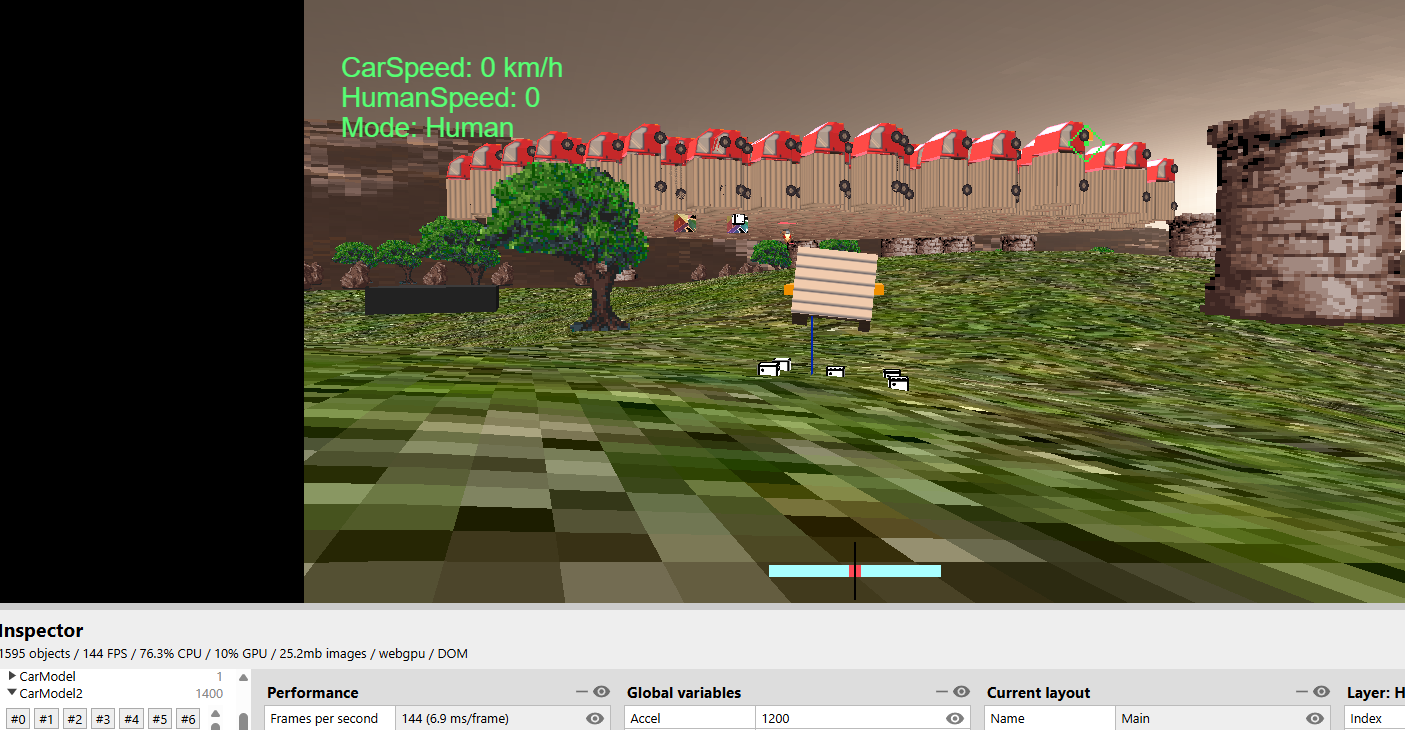
frame skip is such a good feature. got a high detailed mesh without any animations
mesh
without frameskip = 60% cpu, 35 fps
with frameskip 100 = 20% cpu, 144+ fps
and
3dmodel with this mesh = 98% cpu, 65 fps
a test with set position lag and frameskip lag vs 3dmodel
even without frameskipping it still lags,
https://www.mediafire.com/file/ehsupy9sdj8rexk/POSITIONLAG.c3p/file
+1 for this. My character is looking glitchy trying to keep up with my player box.
hi this is a test with 3 meshes.
1 = bones with no animation is invisible or doesnt work
2 = bones with animation works fine
3 = mesh with vertex group is invisible or doesnt work
https://www.mediafire.com/file/0lo7k8kpwvpmwyq/BonesAnimationBug.c3p/file
thanks! will have time Monday
i got this fixed, i cant figure out the set position lag
this model with shape keys and vertex groups isnt loading in mesh, and a model with an armature and no animations loads very tiny and does not scale up and completely wrong position
https://www.mediafire.com/file/ysumlgb9mx7q9t9/Cannon.glb/file
setting the mesh position to a sprite lags behind (doesnt with 3d model) and with frame skipping it lags behind a lot.
im trying to give my game that low framerate look for characters and frameskipping works good for it + the pros of performance. but setting their position to their hitbox does not work well with it.
tell me more, why does hitbox not work well, I imagine it's the lag above, I will take a look at that, if you have a sample project, that would help
setting mesh position to sprite and using animation frame skip makes it lag. also without frameskip it still lags a bit compared to 3d model
https://www.mediafire.com/file/rjreeykgxfhamjf/TESST.c3p/file
The marble example crashes C3. (485) I have gone as far back as beta 479 but it is still crashing. could it be an addon issue?
Error report information
Type: unhandled rejection
Reason: Error: Failed to fetch @ TypeError: Failed to fetch
Stack: TypeError: Failed to fetch
Construct version: r485
URL: https://editor.construct.net/r485/
Date: Sun May 17 2026 17:29:00 GMT-0400 (Eastern Daylight Time)
Uptime: 320.8 s
Platform information
Product: Construct 3 r485 (beta)
Browser: Chrome 148.0.7778.168
Browser engine: Chromium
Context: browser
Operating system: Windows 10
Device type: desktop
Device pixel ratio: 1
Logical CPU cores: 24
Approx. device memory: 32 GB
User agent: Mozilla/5.0 (Windows NT 10.0; Win64; x64) AppleWebKit/537.36 (KHTML, like Gecko) Chrome/148.0.0.0 Safari/537.36
Language setting: en-US
WebGPU information
Renderer: WebGPU
Compatibility mode: no
Supports GPU profiling: yes
Major performance caveat: no
Maximum texture size: 16384
Adapter vendor: nvidia
Adapter architecture: lovelace
Adapter device: (unavailable)
Adapter description: (unavailable)
Adapter type: (unavailable)
Adapter backend: (unavailable)
Adapter features: bgra8unorm-storage, clip-distances, core-features-and-limits, depth-clip-control, depth32float-stencil8, dual-source-blending, float32-blendable, float32-filterable, indirect-first-instance, primitive-index, rg11b10ufloat-renderable, shader-f16, subgroups, texture-component-swizzle, texture-compression-bc, texture-compression-bc-sliced-3d, texture-formats-tier1, texture-formats-tier2, timestamp-query
Hmm, working for me, check for latest addons?
which browser?
windows, chrome
It's "better" but I get a window saying it failed to load the project. how odd.
This is the console
main.js:29 File read error: TypeError: Cannot read properties of null (reading 'Wn')
at globalThis.eE.Wn (textEditor.js:1:3076)
at #j (textEditor.js:1:2134)
at textEditor.js:1:999
at Ld.Event.GLt.FLt (main.js:29:250760)
at window.ove.dispatchEvent (main.js:29:248724)
at window.ove.pMe (main.js:29:1358113)
at t.USe (projectResources.js:1:792011)
at window.ove.MMe (main.js:29:1339538)
at async window.ove.p0 (main.js:29:1338827)
Some stuff missing, set and get mesh angle, and get mesh position
https://kindeyegames.itch.io/c3-3d-bundle/devlog/1526693/add-common-position-ace...
For angle use rotation.
Is it possible to add hierarchies and change opacity? And I found a bug where my models disappear if the object is too high.
For object too high, drop the model here, usually better to have center of model be towards the geometric middle, vs at feet, etc.
its on the middle, it disappears still when moving camera down
https://www.mediafire.com/file/xxc1scpr8xeucae/Airplane.zip/file
For now set bbox scale property to 4 or 5, while I see what C3 wants special for bounding box for 3D.
4 is working for now. Thanks for all the fixes. I got a pretty good game going on thanks to this addon ❤️
Great! Can't wait to see it, I'll tease it with a post here when you are ready!
how can I get the X Y Z coordinates of a mesh object? I only see quat.x, but how do I get the normal coordinates?
you mean the object itself? just use the usual x,y,z of a world instance
https://yapx.ru/album/dnqiw
But there is nothing like that
uj... strange! will look this weekend.
how can I add lighting for a standard 3d shape?
you can’t with this addon
https://kindeyegames.itch.io/c3-3d-bundle/devlog/1526693/add-common-position-ace...
❤️
Nice updates, but what does texture filtering in gltf models on a texture basis mean? My models are pixelated in the new update. Changing layers to trilinear does not work.
it may be because your original model was using nearest textures, or a bug of course. Try it in babylon sandbox. Also share the model. Thanks for reporting.
Ah from inside blender, didn't think that mattered lol. Working now ty.
This is what they look like right now. The first one is wrong because the sword should be on the right hand. The 2nd one is scaled negative with flip v on, its correct but the flip v wasnt needed. The 3rd one with the scaled negative only is actually correct.
I filed it and they added a option to import with option to flip xyz
https://github.com/Scirra/Construct-bugs/issues/9028 Here is test with the model
https://www.mediafire.com/file/me7b1o8k0yhmu5w/TESTTESTTEST.zip/file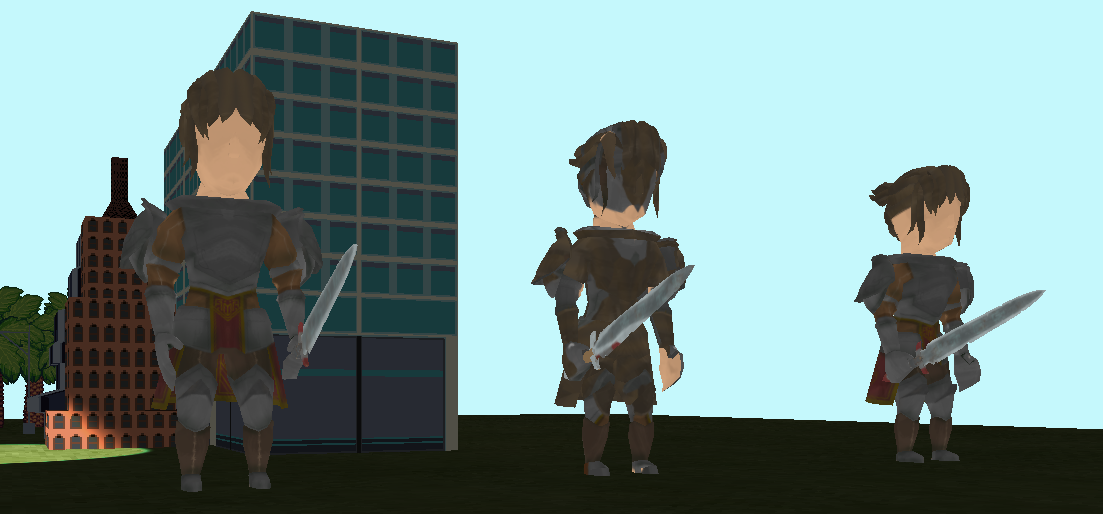
Nevermind on the head with the bone, it works with a new model. Idk what was up with the head and the 1 bone. Only the sampling and the flipped x axis are broken.
https://www.mediafire.com/file/a6no197uf7jab2s/TESTTESTTEST.zip/file
The box on the very right is scaled negative to make it show correctly. Also there might be a bounding box or offset issue too? the model is in the ground when in the editor its above it.
Also the X axis is flipped so stuff like signs appear backwards other than that, this add on is the best for 3d.
Can you also share an example of this, so I can review?
https://kindeyegames.itch.io/c3-3d-bundle/devlog/1517507/add-flip-v-texure-coord...
The C3 3D Model plugin has the same issue of flipping.
Sample to nearest isn't work on mesh. Is there a way to turn it on?
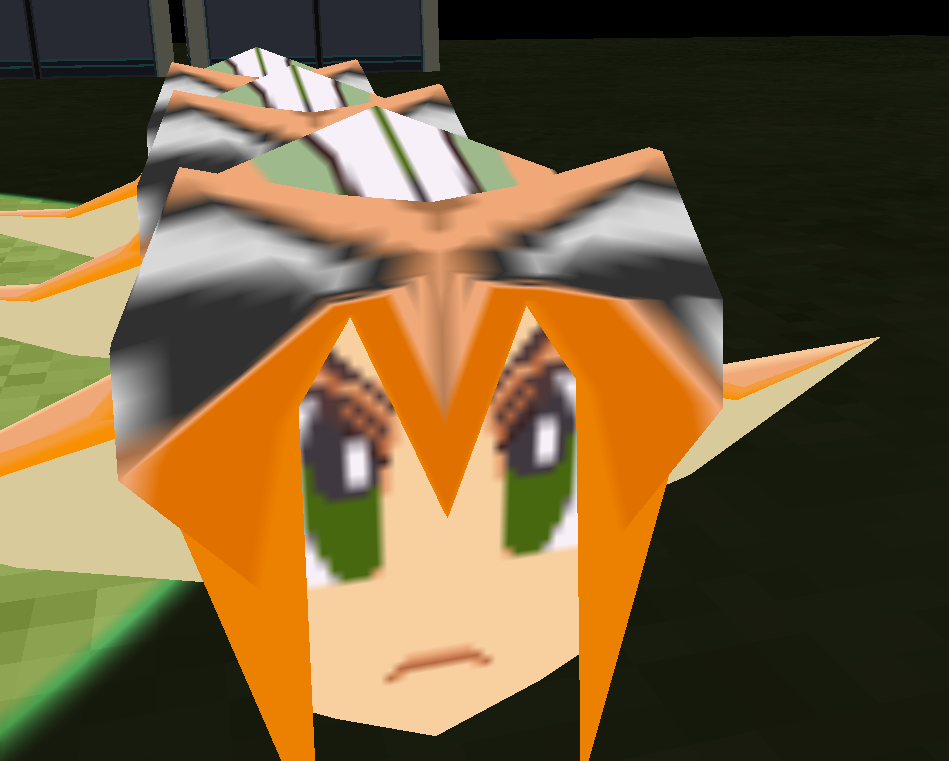
Updating to try this, do you have a sample project for me to test with? Can you share a link?
https://kindeyegames.itch.io/c3-3d-bundle/devlog/1517452/support-different-textu...
Hi, I see that the light object has a [Shadow] parameter, I turned it on, but there were no shadows. Maybe it needs to be configured somehow? I can't figure it out
This is a very high level shadow, just one or a few raycasts from object to light. Also need physics on all objects with shadow occluder enabled. it will be basically just full occlusion for object or not, not at all sharp shadows.
I should probably call it something like light occluder vs shadows. I can't remember if I posted an example, will check later tonight.
Do any of these allow me to rotate a sprite font in 3d? Need player names above their head but the 3d rotate behavior is sdkv1 only
Not really...
I added a new version of rotate 3D which will work with sdk v2
You are a beautiful individual!
The models disappear depending on the camera's angle, is there a way i can fix this? (I started to use C3 this year, sorry if the question seems stupid)
This is a bounding box issue, some fixes to try. Make sure the center in the model is located in the geometric center (e.g. not on side or other).
Thank you so much for working on this and making it so accessible, this is something C3 really needs.
The official 3D plugin is on the left, and for some reason your 3D model is not displayed on the right
https://postimg.cc/kDYYKBry
https://dropmefiles.com/tJUZR
It looks like editor and runtime are using different scaling values, I'll review. Try this one (barely visible in editor, but larger during runtime.)
https://sendgb.com/31xmqWHD4uT
Okay, thanks
Bro, it's a bugger
Hi, how is the performance ( 3d models with animation ) in this version compared to SDK version 1? Is it improved?
Not yet, waiting for C3 to enable using custom vertex shaders (e.g. for skinning)